Lossless Methods: Compression of Streams and Fonts

Table of contents
Here are the links for the two previous articles of the series:
- 1. Introduction to the Optimization of Existing PDF files: Methods(opens in a new tab)
- 2. Lossless Methods: Optimization of Document Content(opens in a new tab)
A PDF document is composed of various data structures, described as different objects. In the scope of optimization, one is particularly important: the stream object. This object aims to store binary data representing the content of an image, font file, color profile, embedded file, or other. Stream objects offer various filters(opens in a new tab) to compress the data they encapsulate. At the same, these are the only objects whose contents can be compressed.
Version 1.5 of the PDF format introduces a new type of stream, an object stream (ObjStm). It is a collection of many PDF objects together inside a single binary stream. The purpose of this type of object is to allow the compression of PDF objects not of the stream type.
This process considerably reduces the size of PDF files.
Compression of objects of type Stream
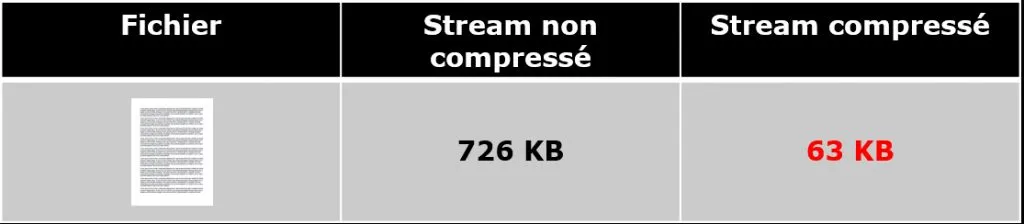
As said, each stream object could represent the data in a compressed way. However, it is not uncommon for applications producing PDF files not to use this possibility. In those situations, it will be appropriate to regenerate the file by compressing the data of these objects.
The attached example illustrates file size reduction after compressing a stream:
Compression of other types of objects using Object Streams
Many PDF creators do not use object stream (ObjStm) types and therefore, do not compress all the embedded data in the generated files. It is easy to determine if the produced file uses this feature. With a simple text editor, you can easily check if the version of the PDF file is greater than or equal to 1.5. You can also observe if data of types like boolean, numbers, strings, dictionaries, etc. are "readable."
In this case, it will be convenient to regenerate the file by grouping and compressing objects that are not of type stream into a sequence of objects - object streams. File size reduction demonstrates the attached example.
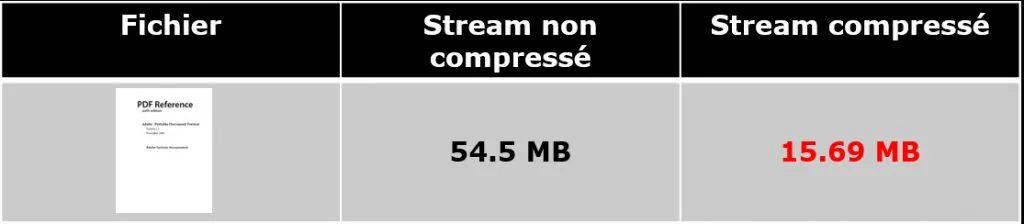
GdPicture.NET offers compression of PDF files by using the EnableCompression() method(opens in a new tab).
You will find an example of usage in our reference guide(opens in a new tab).
Limitations
Reading and decompressing the extensive stream collections to access single objects may downgrade the performance. Consequently, some restrictions occurred to prevent this.
- The number of serialized objects in the stream collection can belimited. Adobe recommends a limit of 200 objects for non-linearized files and100 objects for linearized files.
- The objects achieving an optimal compression ratio can be grouped.An approach by nature can be practical at the first level. Some operationalresearch should also provide adaptive serialization to increase performance andcompression.
Compression of fonts
Font programs are a necessary part of the PDF document structure. For a general overview of fonts in PDF documents, you can read our previous article here(opens in a new tab).
The font files are incorporated within the document **totally **or partially.
It depends on the version of the produced PDF file.
- Totally means that the file describing the font is entirely embedded inthe document. This is useful when the file will be edited during its lifecycle. For example, the font Arial Unicode weights 22 megabytes under Windows10.
- Partially means that a new font file will be generated to contain only thedescription of the characters used in the produced document.
There are three approaches to font optimization. They are described in detail in this article(opens in a new tab). Below is a quick overview.
Font file optimization
The process involves parsing and separating text by fonts used for the document rendering. It is also useful when fonts are already subsetted, but the font program still contains unused glyph definitions or unnecessary font data tables. The most common scenario resulting in such documents is splitting or extracting pages when PDF applications do not optimize font programs in produced documents.
Deduplication of fonts
Often a document contains several times the same version of a font file. This is mostly the result of merging several documents into one. The font deduplication optimization process identifies these occurrences and replaces the font program resources with shared or referenced one for all pages using that particular font. This process produces significant results in file size reduction.
Font subset merging
This optimization performs conversion of embedded fonts into partial character sets once the deduplication process is complete. It is primarily useful when the generated document is not intended to be modified. The process recreates a font file and only integrates the data related to the characters used in the document.
Here is an example of file size reduction when optimizing fonts.
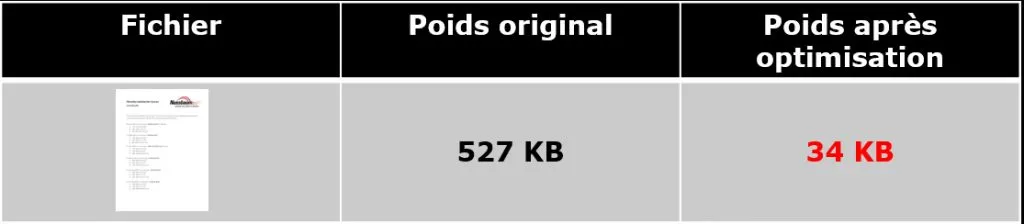
All the above-mentioned approaches retain the document's visual appearance untouched.
When compressing, no data are lost, therefore they are lossless.
The next article will be about methods with losses: JPEG2000 and JBIG2.
Cheers!
How to Get Started
Integrating GdPicture into your applications is quick and easy. For a customized evaluation and demo, please contact our team of experts(opens in a new tab), and we will guide you properly for your use-case and requirements.
Alternatively, you can also download it for free.(opens in a new tab)