Table Extraction Series – Part 3: Layout Understanding Approach

Table of contents
You can read the first articles of the Table Extraction series here
Part 1: Challenges(opens in a new tab)Part 2: Deep Learning Approaches(opens in a new tab)
A performant table extraction system must detect, recognize, and understand a document, ideally without a model.
We’ve seen that OCR can do a good job(opens in a new tab) with clean and simple tables on high-quality documents.
We’ve also mentioned that machine learning and deep learning models(opens in a new tab) rely on templates. If they provide excellent results, they are heavy on resources.
Our approach for the GdPicture.NET Table Extraction component is to add a layer of understanding to the document that doesn’t need any predefined training model. That’s what we call the unsupervised Layout Understanding approach.
The layout understanding technologies combine layout analysis, OCR, Key-Value Pair extraction, NLP, and Named-Entity Recognition. The goal is to achieve what we call creator intent.
Indeed, understanding the purpose of a document enables better decision-making for extraction, qualification, and conversion.
The GdPicture.NET Table Extraction component actually includes three internal engines:
- Table detection,
- Table decoding,
- Table conversion.
The table detection and decoding engines have been available in the SDK since version 14.2(opens in a new tab).
The table conversion engine currently provides a set of low-level APIs which can be used to export the content.
In the next GdPicture.NET release, we’ll offer the possibility to export tables to Excel spreadsheets with various options while keeping the original document's style (text & cell colors, font size & type, etc.).
As for any other Machine Vision project (such as OCR and KVP), we are orchestrating different rules and subsystems driven by fuzzification and voting based on our in-house scoring system and refiners usage.
Our components are 100% machine learning models free, with an unsupervised approach and without the need for human intervention.
Thanks to strict experimentation, testing protocols that follow Test-Driven Development methodologies, and a consequent testing database, we can provide engines that deliver outstanding results on business documents.
If we want to list the most distinctive features of the GdPicture.NET Table Extraction component, we will say that:
- It can be used in any application (desktop or server) without any cloud connection or dependency.
- No model or external resource (database) dependency is needed.
- It includes strong cell headers detection.
- It tries to split complex tables into nested fixed tables.
- It detects and outputs all physical layout information.
- It determines table rows/columns based on the fuzzification of logical and physical layout decoding (see Figure 1 below).
- The processing time is extremely fast. We can obtain OCR, layout, KVP, and table information from most business documents in [0.6 ms - 2 sec].
- It works on any document we support(opens in a new tab) (vector & digital born).
- It works on broken/partial content.
- It makes the best use of resources available thanks to adaptive engines.
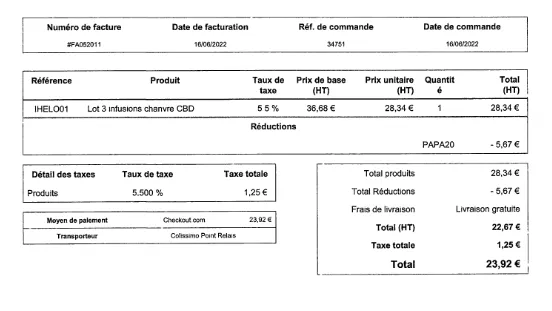
Figure 1 - Input: 5 tables, with partial physical layout.
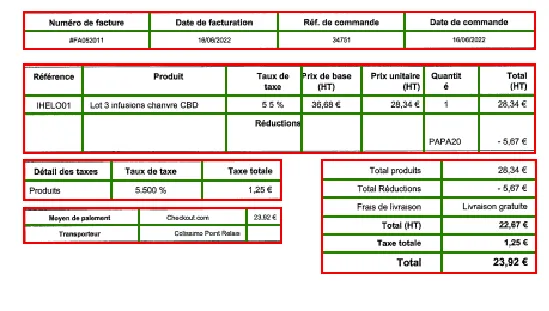
Output: The engine is able to determine columns and rows based on “missing” information. This is a perfect illustration of the fuzzification of 2 concurrent top-down and bottom-up approaches.
Thanks to ever-growing datasets, the Table Extraction component is under continuous development and delivery, as are all our tools and engines. We saw in Part 1 of this series(opens in a new tab) that there are as many different layouts as there are documents, so detecting, recognizing, and converting tables is a never-ending project.
Our R&D team is currently working on two challenges:
- The detection of tables without physical outer borders.
- Detecting complex spanning configurations (when there are several headers of different sizes in the same table, for example).
If you’re not getting the results you would like while testing GdPicture.NET, do not hesitate to send us the original document (if possible) so we can analyze it and include it in our testing process.
When testing our IDP tools, and as a general rule, always make sure that you’re using the latest GdPicture.NET version available, as we’re improving it each week:
You can also test table extraction on the live demo from the PSPDFKit website:
And if you want to know more about our IDP SDK, here is the recording of our latest webinar: